
Overview #
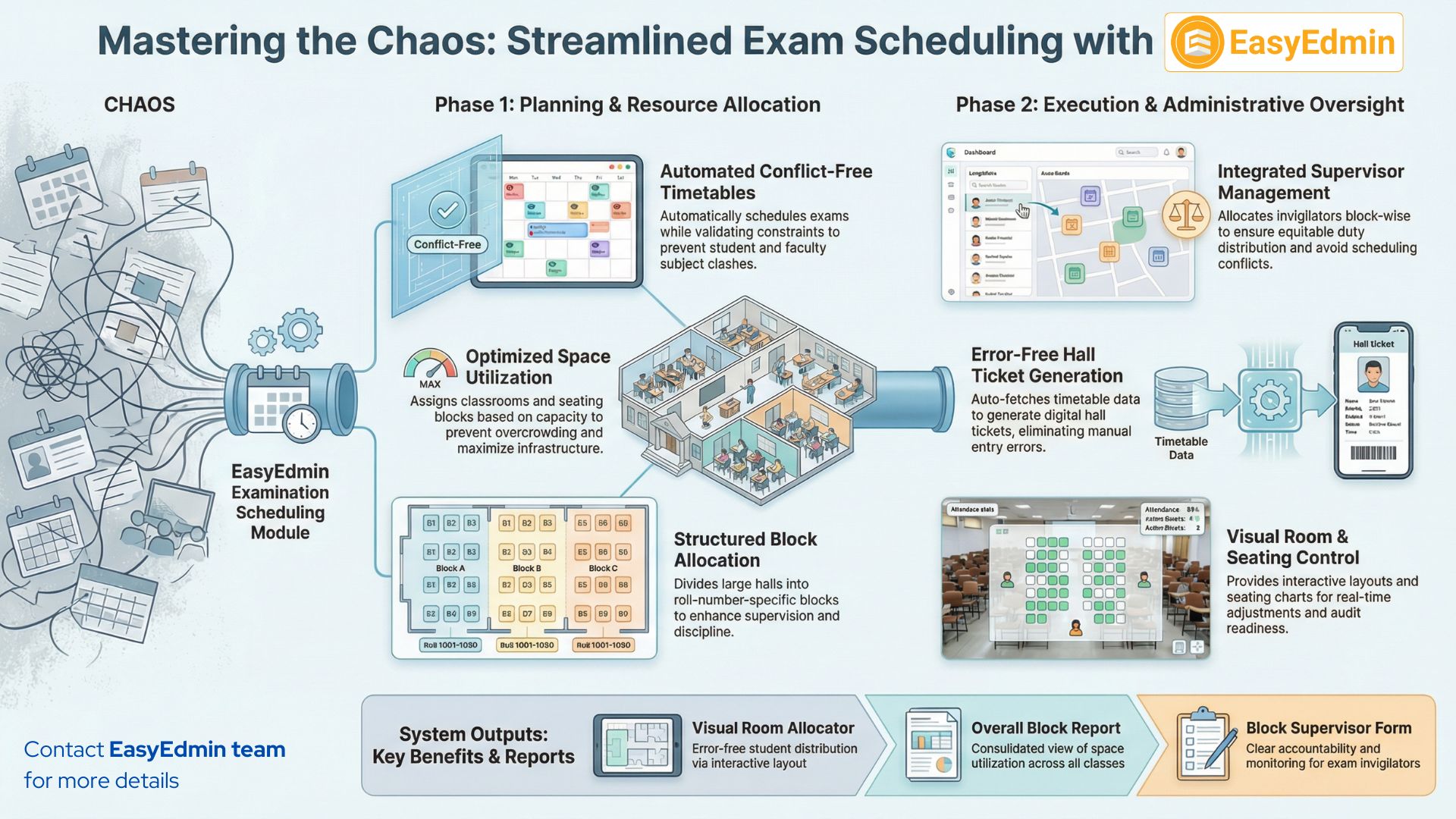
The Examination Scheduling Module is a critical component that automates and manages the planning, coordination, and execution of examination timetables. It ensures that exams are scheduled systematically, without conflicts, and in alignment with institutional policies and academic calendars.
Key Features #
- Exam Timetable Creation
- Define examinations
- Schedule subject-wise exams by class, course, or department
- Set subject exam timing and duration
- Avoid student subject clashes automatically
The system can validate constraints to prevent overlapping exams for students or faculty.
- Seating Allocation
- Assign classrooms or halls based on seating capacity
- Assign students to specific rooms and seats
- Allocate different rooms for different courses or batches
- Optimize space utilization
This ensures fair distribution and prevents overcrowding or underutilization.
- Block Allocation
- Dividing a large exam hall into multiple seating blocks
- Assigning a specific range of roll numbers or students to each block
- Preventing confusion during seating and attendance marking
Structured block-based seating system enhances supervision efficiency, improves discipline during examinations, and ensures smooth coordination on exam day—especially in large halls accommodating multiple courses or batches simultaneously.
- Supervisor Assignment
- Allocating supervisors block-wise for better monitoring
- Avoid scheduling conflicts
- Maintain equitable duty distribution
- Generate invigilation duty lists
This reduces manual coordination and ensures accountability.
- Hall Ticket Integration
- Auto-fetching exam schedule details
- Generating hall tickets in bulk or individually
- Enabling digital download through the student interface
Eliminates manual errors, ensures consistency between the timetable and hall ticket, and provides students with accurate, real-time examination details.
- Reporting
- Generation of detailed exam timetable reports
- Room and block allocation reports
- Supervisor duty reports
- Seating arrangement summaries
Support better decision-making, improve coordination among departments, and ensure preparedness before examinations.
Important Reports/Views #
The Examination Scheduling Module offers comprehensive reports that provide clear visibility into resource allocation. These reports assist in effective decision-making, audit readiness, and strategic planning.
- Visual Exam Room Student Allocator
The Visual Exam Room Student Allocator is an interactive view within the Exam Scheduling module that helps administrators assign students to exam rooms in a clear and organized manner. It provides a visual layout of rooms, seating capacity, and student distribution, making allocation simple and error-free.
This feature helps avoid overcrowding, ensures proper seating arrangements, supports hall-wise planning, and allows quick adjustments when required. Overall, it streamlines exam room management with better visibility and control.
- Exam Timetable
Generate ready-to-print exam schedules directly from the ERP system. It includes exam dates, subjects, timings, class/division details, and instructions.
It ensures accurate, standardised, and error-free communication for students, teachers, and administrators without manual preparation.
- Overall Block Allocation Reports
The Overall Block Allocation Report provides a consolidated view of exam hall/block assignments across all classes and exams. It shows which block or building area is allocated, the exam date and time, assigned classes or subjects, and seating capacity utilization.
This report helps administrators monitor space planning, avoid overlaps, and ensure efficient use of infrastructure during examinations.
- Exam Room Block Allocations
This report provides a detailed view of exam room allocations within each block for a specific exam schedule. It includes room numbers, assigned classes/subjects, exam date & time, and seating capacity details.
- Exam Room Seating Chart
The Exam Room Seating Chart displays the student-wise seating arrangement for a specific exam room. It includes student names or roll numbers, seat numbers, class/division, and room details.
This ensures organized seating, prevents confusion or malpractice, and helps invigilators manage exams smoothly and efficiently.
- Block Supervisor Form
The Block Supervisor Form is a structured document generated from the ERP for supervisors assigned to a specific exam block.
This form ensures clear responsibility, smooth coordination, and proper monitoring of examination activities within each block.


