Skip to content
  • +91 98253 20810
  • contact@pixeta.net

Docs

  • EasyEdmin Documents
  • Info-graphics
  • EasyEdmin Documents
  • Info-graphics

Documents

  • Introduction
    • EasyEdmin Overview
    • Overall Benefits
    • Win-Win for Everyone
    • From Setup to Success- We Stand With You
    • Breaking ERP Myths – Building EasyEdmin Trust
    • One Unified Platform – Complete Institutional Control
    • Empowering Every User – Not Just a Few
  • System Architecture
    • Hybrid Architecture — The Best of Both Worlds
    • Architecture Overview
    • Backup Mechanisms
    • Integrations
  • Core Concepts
    • Core Academic Structure
  • Modules
    • Academics
      • General Register
    • Financials
      • Fee Management
    • Administrative
      • Certificates & Forms
      • I-Card Management
      • Examination Scheduling
    • Facilities
      • Asset Management
      • Reminders
    • Interactions
      • Message Center
      • Circulars
  • Features
    • Strong Password Mechanism
    • Notification Center
  • Parent/Student Mobile App
    • Key Features Available for Parents/Students
    • User Guide

Downloads

  • Software Setup
  • EasyEdmin Manager
  • EasyEdmin Desk
  • EasyEdmin Android App
  • EasyEdmin iOS App

Best Practices

  • Why School ERP Needs WhatsApp Integration 
  • System Setup
  • Data Migration / Setup
  • User Role Distribution
  • Query Resolution
  • Server Migration
  • Roll Number Management
  • Student Attendance Management
  • Academic Class Management

General Problems

  • Message is not received in Institute App
  • USB backup failure
  • Server is not connecting
  • EasyedminDesk not opening

Approach & Processes

  • Continuously Improving – Constantly Evolving
  • Problem Resolution Approach

Other Knowledge Base

  • Holistic Progress Card
View Categories
  • Home
  • Docs
  • Documents
  • System Architecture
  • Architecture Overview

Architecture Overview

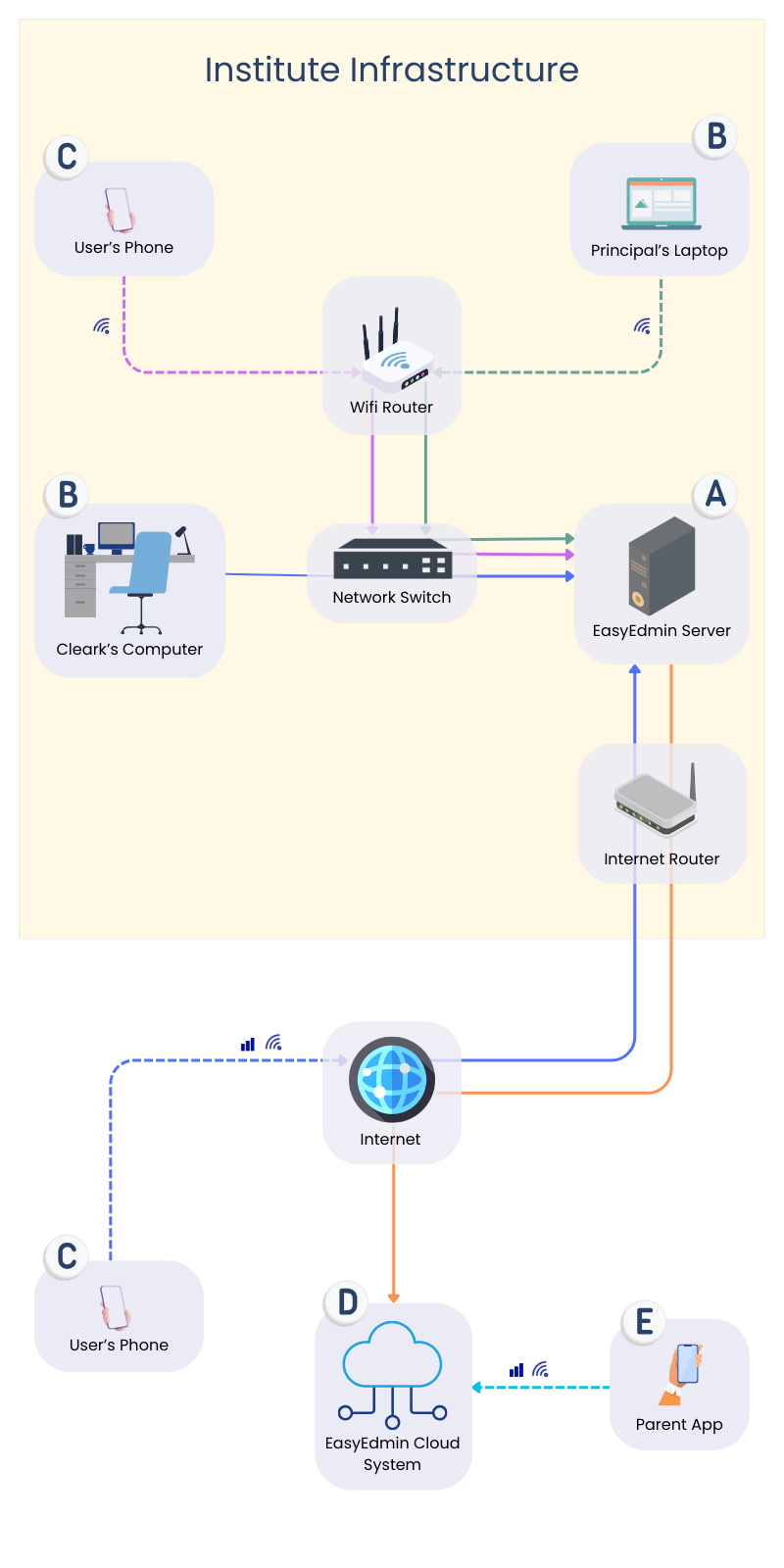
EasyEdmin ERP follows a hybrid model which can be deployed either on-premises (in the institute) or in the cloud. The image below describes the most popular on-premises implementation of the EasyEdmin ERP.

Here is the brief working of different system components:
EasyEdminServer #

Single solution providing software for all academic, financial, and administrative needs. Using separate software for different areas in an institute can lead to a range of issues that impact both efficiency and the quality of educational services. 

EasyEdminDesk #

It’s a windows application that runs on computers and laptops, providing system access to users by communicating with EasyEdminServer. It is designed to provide optimized performance and hence generates smoother operational experience than web interface.

EasyEdmin User Mobile App #

Android and iOS applications are available in PlayStore and AppStore respectively, providing system access to users by communicating with EasyEdminServer.

EasyEdmin Cloud System #

It’s a distributed, load-balancing system that holds the data especially required to present into student/parent logins 24×7. EasyEdminServer auto synchronizes such data into the cloud system.

EasyEdmin Parent/Student Mobile App #

Provides access to student specific information mainly by communicating with EasyEdmin Cloud System. It may communicate directly with EasyEdminServer for few services.

What are your Feelings

Share This Article :

  • Facebook
  • X
  • LinkedIn
  • Pinterest
Any Questions? How can we help?

How can we help?

Updated on February 24, 2026
Hybrid Architecture — The Best of Both WorldsBackup Mechanisms
Table of Contents
  • EasyEdminServer
  • EasyEdminDesk
  • EasyEdmin User Mobile App
  • EasyEdmin Cloud System
  • EasyEdmin Parent/Student Mobile App
  • +91 98253 20810
  • contact@pixeta.net
Facebook-f Twitter

Address

  • 13, Dharmabhakti Complex, Khushalvadi, Jamalpore, NAVSARI-396445, Gujarat, INDIA.

Email:

  • contact@pixeta.net

Locat Us

Ⓒ 2026, Pixta App Lab

Designed by:

Pixeta