
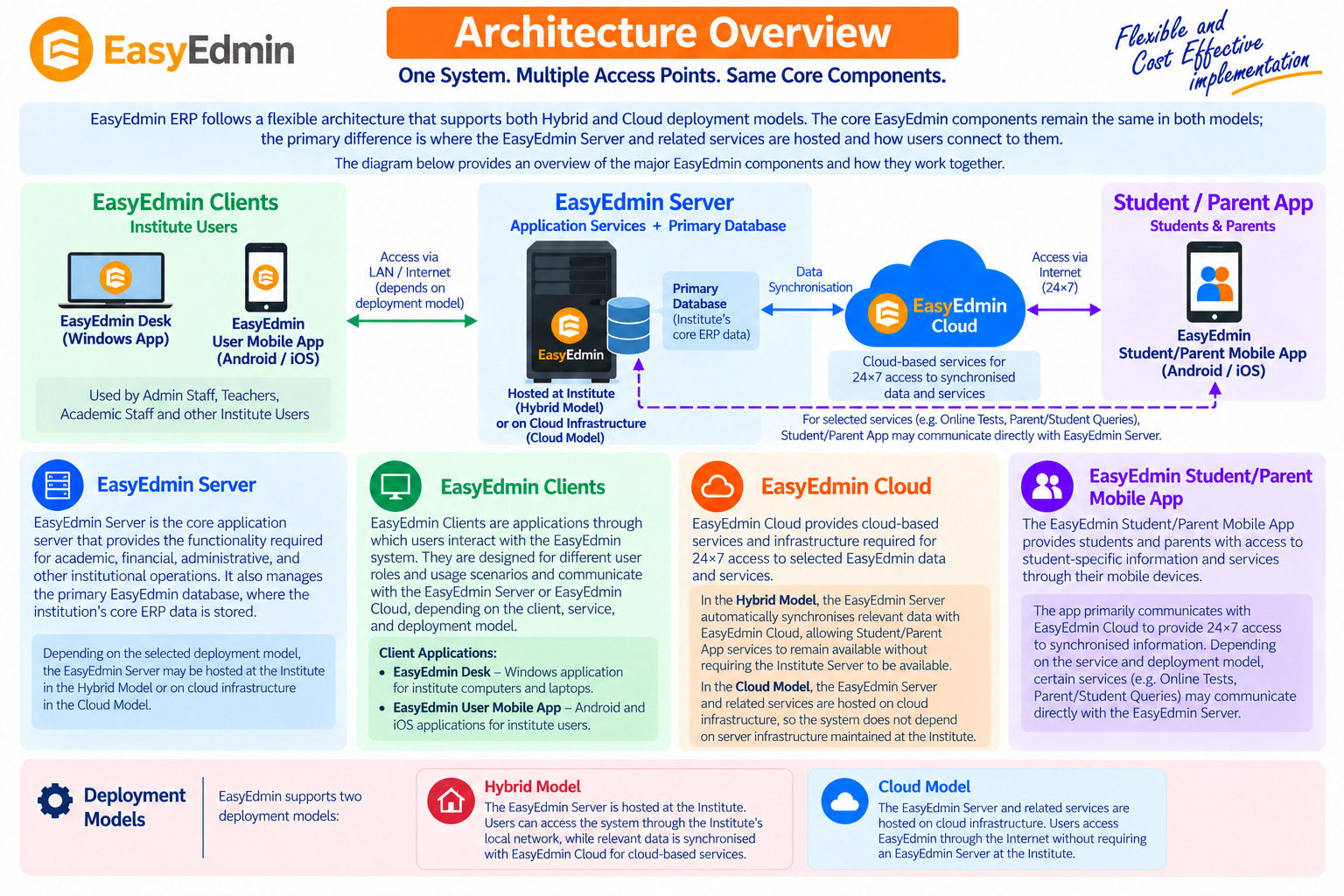
EasyEdmin ERP follows a flexible architecture that supports both Hybrid and Cloud deployment models. The core EasyEdmin components remain the same in both models; the primary difference is where the EasyEdmin Server and related services are hosted and how users connect to them.
The diagram below provides an overview of the major EasyEdmin components and how they work together.
EasyEdminServer #
EasyEdmin Server is the core application server that provides the functionality required for academic, financial, administrative, and other institutional operations. It also manages the primary EasyEdmin database, where the institution’s core ERP data is stored.
Depending on the selected deployment model, the EasyEdmin Server may be hosted at the Institute in the Hybrid Model or on cloud infrastructure in the Cloud Model.
EasyEdmin Clients #
EasyEdmin Clients are applications through which users interact with the EasyEdmin system. They are designed for different user roles and usage scenarios and communicate with the EasyEdmin Server or EasyEdmin Cloud, depending on the client, service, and deployment model.
EasyEdmin provides the following client applications:
- EasyEdmin Desk — A Windows application for institute computers and laptops, designed for day-to-day operational use and optimized for communication with the EasyEdmin Server.
- EasyEdmin User Mobile App — Android and iOS applications that provide institute users with access to relevant EasyEdmin services through mobile devices.
EasyEdmin Cloud #
EasyEdmin Cloud provides cloud-based services and infrastructure required for 24×7 access to selected EasyEdmin data and services.
In the Hybrid Model, the EasyEdmin Server automatically synchronises relevant data with EasyEdmin Cloud, allowing Student/Parent App services to remain available without requiring the Institute Server to be available.
In the Cloud Model, the EasyEdmin Server and related services are hosted on cloud infrastructure, so the system does not depend on server infrastructure maintained at the Institute.
EasyEdmin Student/Parent Mobile App #
The EasyEdmin Student/Parent Mobile App provides students and parents with access to student-specific information and services through their mobile devices.
The app primarily communicates with EasyEdmin Cloud to provide 24×7 access to synchronized information. Certain services (like Online Test, Parent/Student Queries) may communicate directly with the EasyEdmin Server.
Deployment Models #
EasyEdmin supports two deployment models:
Hybrid Model:
The EasyEdmin Server is hosted at the Institute. Users can access the system through the Institute’s local network, while relevant data is synchronized with EasyEdmin Cloud for cloud-based services.
Cloud Model:
The EasyEdmin Server and related services are hosted on cloud infrastructure. Users access EasyEdmin through the Internet without requiring an EasyEdmin Server at the Institute.
For a detailed comparison of the two deployment models, see Deployment Models — Hybrid & Cloud.


