
EasyEdmin Hybrid combines the speed and control of an Institute-hosted system with the accessibility and connectivity of cloud services.
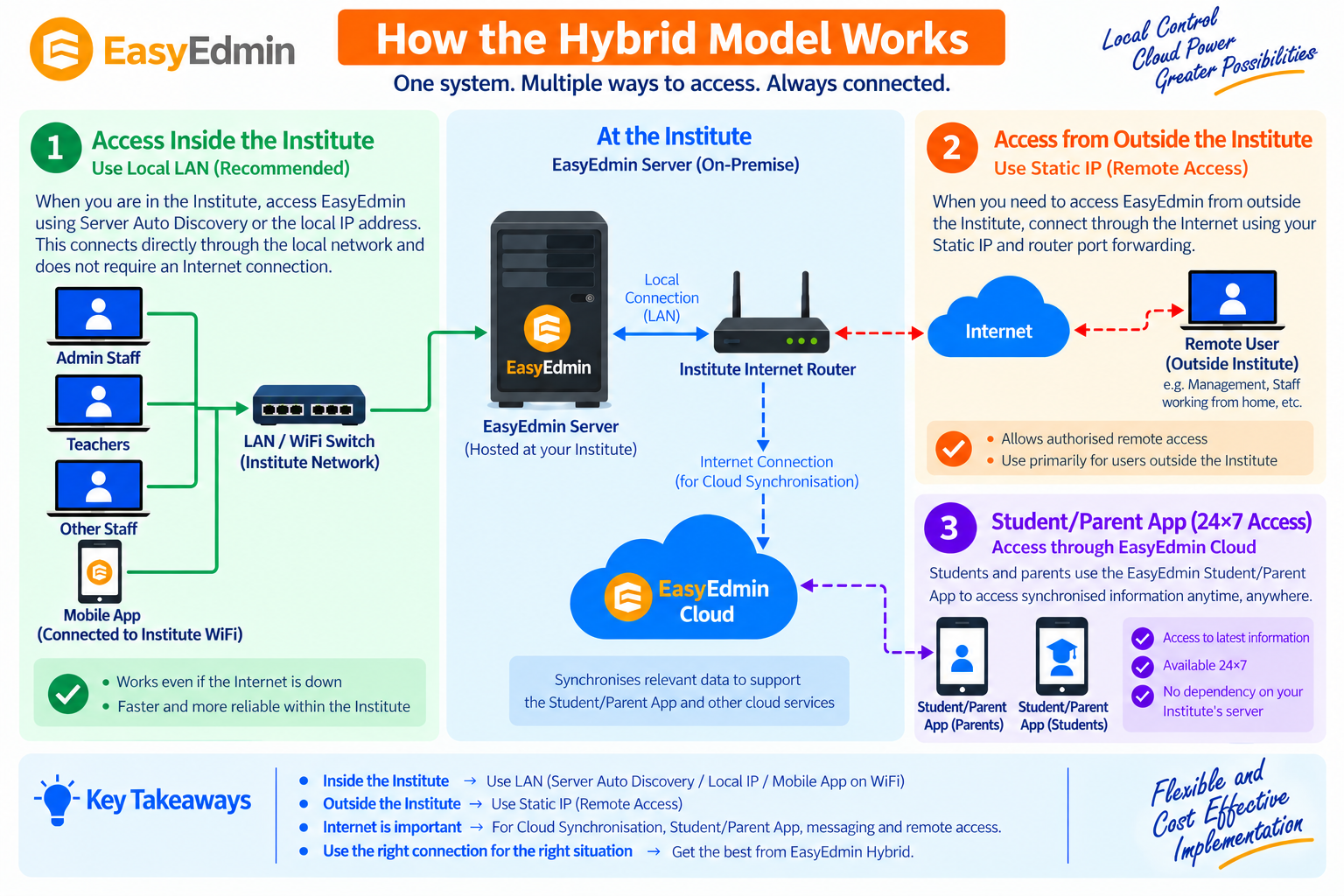
In the Hybrid Model, the EasyEdmin Server and primary database are hosted at the Institute, allowing institute users to work through the local network without depending on the Internet for normal ERP operations. Relevant data is automatically synchronised with EasyEdmin Cloud, enabling cloud-based services such as the Student/Parent App to remain available 24×7.
This approach provides a practical balance of local performance, data control, cloud accessibility, and cost efficiency.
How the Hybrid Model Works #
When users are working inside the Institute, EasyEdmin can be accessed through the local LAN or WiFi network using Server Auto Discovery or the local IP address.
Because communication takes place through the local network, normal ERP operations do not depend on the Internet connection.
The EasyEdmin Server is lightweight and can generally run on a regular modern PC, making the Hybrid Model practical without requiring dedicated high-end server hardware.
Mobile users can also connect to the EasyEdmin Server through the Institute’s WiFi network when using services that require direct server communication.
Authorized users who need to access the Institute-hosted EasyEdmin Server from outside the Institute can connect through the Internet using a Static IP and appropriate router configuration.
This enables authorized users, such as management or staff working from home or another location, to access services that require direct communication with the Institute Server.
Remote access is an additional capability of the Hybrid Model and does not change the way users inside the Institute should normally connect.
The EasyEdmin Server automatically synchronises relevant data with EasyEdmin Cloud.
The Student/Parent App primarily communicates with EasyEdmin Cloud to provide students and parents with access to synchronised information 24×7, without requiring the Institute Server to be available.
For selected services, such as Online Tests and Parent/Student Queries involving two-way communication, the Student/Parent App may communicate directly with the Institute’s EasyEdmin Server.
Key Benefits of the Hybrid Model #
Most institute operations take place through the local network, providing fast response times without depending on Internet bandwidth for routine ERP operations.
Because the primary EasyEdmin Server is available locally, institute users can continue normal ERP operations even when the Internet connection is temporarily unavailable.
Relevant data is automatically synchronised with EasyEdmin Cloud, allowing the Student/Parent App to provide access to synchronised information even when the Institute Server is temporarily unavailable.
Authorised users can access the Institute-hosted EasyEdmin Server from outside the Institute using Static IP and appropriate router configuration.
The primary EasyEdmin database remains within the Institute, giving the institution direct control over its primary ERP data and local server environment.
EasyEdmin Server is lightweight and can generally run on a regular modern PC, making an Institute-hosted deployment practical without requiring dedicated high-end server hardware.
Since the core EasyEdmin Server is hosted at the Institute, the Hybrid Model generally avoids recurring cloud hosting costs for the core ERP system.
Relevant data can be maintained in the Cloud as an additional layer of protection for backup and disaster recovery.
The Best of Both Worlds #
The Hybrid Model brings together:
Local Performance: Fast access through the Institute’s LAN/Wi-Fi network.
Local Control: Primary ERP database hosted at the Institute.
Cloud Accessibility: Relevant data synchronized with EasyEdmin Cloud for 24×7 cloud-based services.
Remote Access: Authorized users can access the Institute Server remotely when required.
Cost Efficiency: Lower recurring cloud hosting requirements while retaining the benefits of cloud connectivity.
Together, these capabilities provide a deployment model that combines the advantages of local infrastructure and cloud services without requiring the Institute to choose between them.
Why We Recommend the Hybrid Model #
For institutes that have a reasonable local network and do not have heavy requirements for services that need continuous direct communication with the Institute Server from outside the campus, the Hybrid Model offers an excellent balance of:
Performance + Control + Accessibility + Cost Efficiency
It provides the convenience of cloud-connected services while keeping the core ERP system available locally.


